Slide Linux Agent
The Slide Linux Agent is a Linux package that runs as a systemd service and communicates with the Slide Box and the Slide Cloud to facilitate backups. For backups to function, the Slide Agent must be installed on the computer that you want to back up.
The Slide Linux Agent runs on supported distributions and uses the mooCBT kernel module (installed via DKMS) for change tracking. This page explains installation, supported file systems, current limitations, and other notes.
Installation
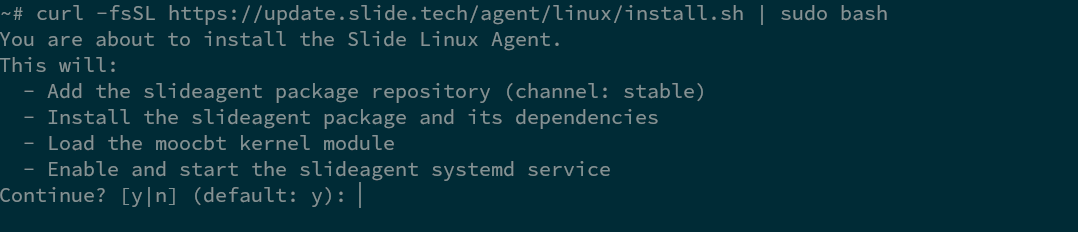
You can install the Slide Linux Agent by running the following command on any supported distribution and version. Press enter when prompted to confirm the install and to enable updates.

Tip
For non-interactive installation, you can pass -y to automatically accept all prompts.
After the installation is complete, you will see the pairing code at the bottom of your terminal. Navigate to your Slide Boxes page to pair the Slide Agent with a Slide Box. Detailed steps can also be found in the Getting Started guide.

Note
Installation will fail if other backup software is detected (e.g. Datto Linux Agent). Uninstall the conflicting agent/driver packages before attempting to install the Slide Linux Agent.
Example of error:
The following packages have unmet dependencies. moocbt-dkms_0.12.6-1ubuntu22.04_amd64 : Conflicts: dattobd-dkms_0.12.2-44.1ubuntu22.04 E: Unable to correct problems, you have held broken packages.
RMM Installation
For scripted or RMM deployments, pass a pairing credential to the installer with the -p flag (or the PAIR_CODE environment variable) to pair automatically instead of pairing manually afterward. This is the Linux equivalent of the Windows installer's /C flag, and accepts any of the same credential types described in RMM Installation:
- A per-agent pair code obtained from the API
- A Slide Box's device pair secret
- Your account's account pair secret
Equivalently, using the environment variable:
Tip
Combine -p with -y for a fully unattended install:
View Pairing Code via Command Line
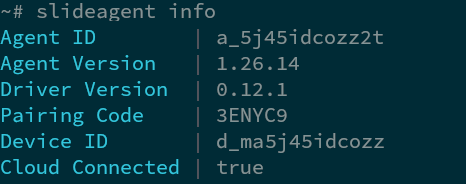
Don't worry if you missed the pairing code. You can always look it up again by running the slideagent command with the info parameter. This will display the agent's info, which includes the pairing code.
Automatic Pairing
Create the agent with the create agent endpoint, passing the ID of the Slide Box you want the agent paired with. Store the pair_code from the response for the next step.
Pass the pair_code from the previous step (ABC123 in this example) to the install script with the -p option, along with -y for a non-interactive install.
The agent pairs on its first check-in, and the installer prints the resulting agent and device IDs. If pairing has not completed by the time the installer finishes, run slideagent info to check the status.
Application-Consistent Backups
Quiescence scripts allow applications to participate in the backup process, producing application-consistent backups. When configured, the agent runs your scripts immediately before and after the volume snapshot is taken, giving applications the opportunity to flush pending writes and reach a consistent state before the snapshot is captured.
Setting up quiescence scripts
Place your script in /etc/slide/agent/quiescence.d/. For the agent to recognize and run it, the script must meet all of the following conditions:
- Be a regular file (not a symlink or directory)
- Be owned by
root - Have permissions set to exactly
0700
Warning
Scripts that do not meet these conditions are silently skipped. After placing a script in the directory, verify its ownership and permissions:
Script interface
The agent calls each script twice per backup and passes the phase as the first argument ($1):
PRE— runs before the snapshot is taken. Quiesce your application here (for example, flush pending writes or pause I/O).POST— runs after the snapshot completes. Resume your application here.
Write a single script that handles both phases by branching on the first argument:
#!/bin/bash
set -euo pipefail

case "$1" in
  PRE)
    # Quiesce your application here (e.g. flush pending writes, pause I/O)
    ;;
  POST)
    # Resume your application here
    ;;
esac
Keep each invocation under 30 seconds. If a script does not finish within this timeout, the agent kills it and all of its child processes.
Execution order
Scripts run in lexicographic filename order during the PRE phase. Successfully executed scripts run in reverse order during the POST phase. Use a numeric prefix to control the order when multiple scripts must run in a specific sequence.
In this example, 01-database runs PRE first, followed by 02-application. On POST, assuming both scripts successfully executed, the order is reversed: 02-application runs first, then 01-database.
Error handling
If a script's PRE invocation fails, the agent immediately calls that script's POST phase as a rollback, then continues with any remaining scripts. The backup still proceeds regardless of quiescence script failures.
Console visibility
An agent's quiescence scripts appear in the agent's details page after its next check-in.
Example scripts
See Quiescence Script Examples: PostgreSQL, MySQL/MariaDB, and SQLite for ready-to-adapt scripts covering these databases.
Linux Agent Known Limitations
File system support
The Slide Linux Agent supports the following file systems.
| Version | Supported |
|---|---|
| ext2/3/4 |  |
| XFS | |
| FAT32 | |
| NTFS |  |
| ZFS | |
| BTRFS | |
Note
NTFS support is planned, however there are no plans to support BTRFS or ZFS at this time.
Note
Backing up filesystems on raw block devices without partition tables is not currently supported.
Note
Linux systems using software raids such as MD arrays are not supported.
Support for LVM is mixed, with more complicated configurations not supported at this time.
- Simple LVM setups, such as a linear volume on one disk without mirroring, striping, or RAID-style LVM layers are supported.
- Mirrored, striped, and RAIDed LVM layouts are not supported.
Storage with disk encryption (dmcrypt, setupcrypt, LUKS) is not supported. Backups may succeed, but restores may not preserve the original encryption scheme. Please note that Slide backups are encrypted themselves, and consider using User Managed Encryption Passphrases.
Supported Ubuntu kernel variants
The Slide Linux Agent relies on the mooCBT kernel module which is known to be supported on the following Ubuntu kernel variants.
| Variant | Supported |
|---|---|
| generic | |
| lowlatency | |
| kvm | |
| aws | |
| azure | |
| gcp | |
| gke | |
Supported architectures
The Slide Linux Agent and the mooCBT kernel module are 64-bit and run on x86_64 architectures.
Secure Boot
The Slide Linux Agent does not support Secure Boot. Secure Boot must be disabled to use the agent and kernel module.
Restore features
The Slide Linux Agent supports the following restore features:
- File restore
- Image export
- Virtualization
- Boot verification
- File search
See the Restores page for detailed instructions.
Agent disabled in virtualizations and image exports
Virtualizations and image exports disable the Slide Agent at creation. Slide removes the systemd enablement symlinks for slideagent.service and slideagent-update.timer.
Re-enabling the agent
If you want to resume backups in a virtualization or image export:
Hardware requirements
The Slide Linux Agent requires the following hardware:
- x86_64 architecture
- 8 GB of RAM
Note
The mooCBT kernel module will use 10% of the volume's storage for its COW file during a backup for each volume in the backup, requiring a minimum of 10MB per volume. This space is freed up after the backup completes and only uses a small fraction (about 0.2%) of the volume's storage to track incremental changes.
Uninstallation
To uninstall the Slide Linux Agent, run the following command.
This will remove the mooCBT kernel module and therefore the Slide Linux Agent which depends on it. Some Agent configuration is left behind to allow reinstallation while maintaining the agent's association with your Slide account and Slide Box.
To remove all traces of the Slide Linux agent, including configuration, use the purge command.
Other notes
Major Distribution Upgrades
Major distribution upgrades, such as an upgrade from Ubuntu 22.04 (jammy) to 24.04 (noble), will require intervention. Distro-provided tooling will not update the installed Slide Linux Agent package repository listing when performing a major distribution upgrade.
On a major distribution upgrade, you need to update /etc/apt/sources.list.d/slideagent.list to match the version codename string of the new version.
For example, if the original version was Ubuntu 22.04, codenamed "jammy":
deb [arch=amd64 signed-by=/etc/apt/keyrings/slide.gpg] https://update.slide.tech/agent/pkg/stable jammy main
and the machine was updated to 24.04, codenamed "noble", then change it to:
deb [arch=amd64 signed-by=/etc/apt/keyrings/slide.gpg] https://update.slide.tech/agent/pkg/stable noble main
Indirect Branch Tracking (IBT)
Systems using IBT are not supported by the Slide Linux Agent, as it may trigger kernel panic with the mooCBT kernel module.
Indirect Branch Tracking (IBT) is a hardware-assisted control-flow integrity feature. Using it requires all of the following:
- A CPU that implements IBT (part of Intel CET and the AMD equivalent).
- Linux kernel 5.18 or newer.
- A Linux distribution that has IBT enabled by default on the distribution's kernel.
Our mooCBT DKMS / build scripts check for this environment because it can not run on systems with IBT. If all the requirements are met, the mooCBT build fails so the driver is never loaded into a configuration where it could cause problems on the machine.
Many recent Intel Core (from roughly 11th-generation “Tiger Lake” onward) and AMD (Zen 3 onward) processors include IBT support. View /proc/cpuinfo (look for ibt in flags on supported kernels) to confirm IBT support for a given host.
If you are unsure whether your system qualifies, rely on the mooCBT build checks: a failed build means the module was not installed because the environment was not considered safe for loading.