Account Settings
The Settings page shows you information about your Slide account. Settings on this page apply to the account as a whole.
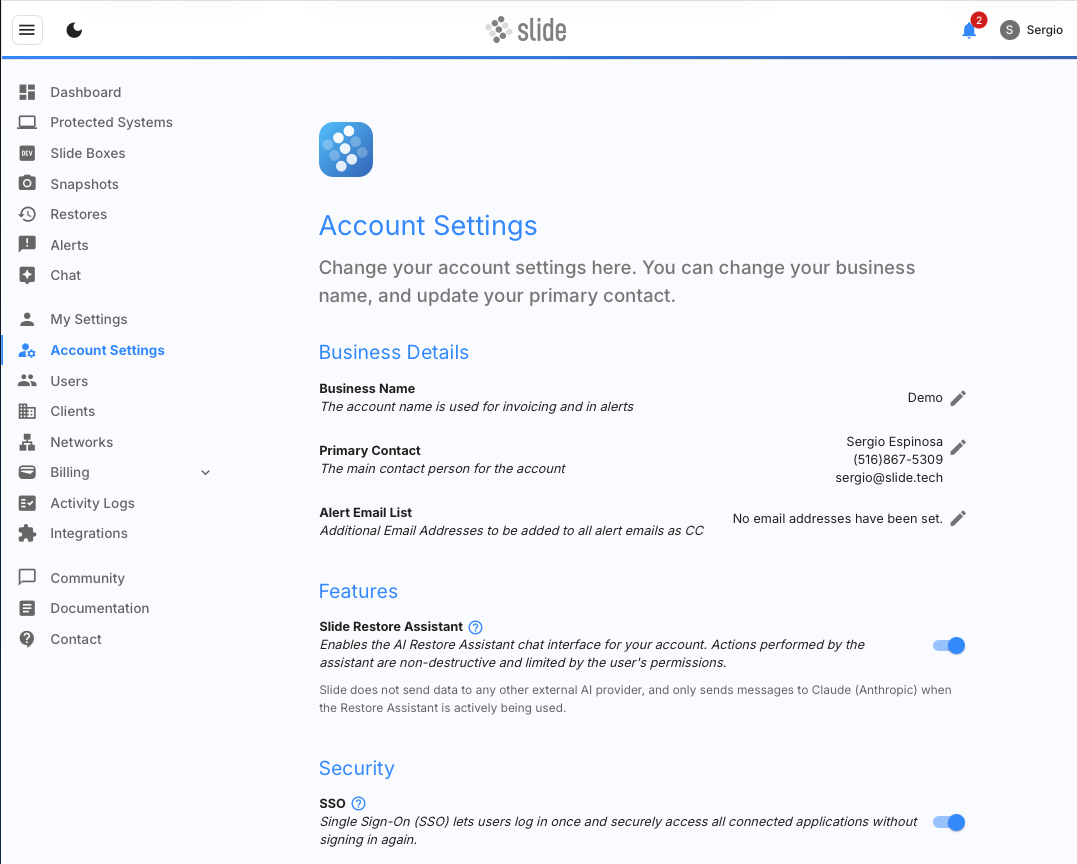
Business Details
The business details section allows you to change your business name, primary contact and alert email list.
Business Name
This name will appear on invoices and alerts. It will also appear in our internal systems when working with support.
Primary Contact
This contact information will appear as our main contact internally. We'll use it when we need to contact your organization.
Alert Email List
Set email addresses that will receive all alert emails as a CC. This setting is useful for PSA email parsers to send all alerts to your PSA as an email. To learn more about Slide's alerts and email notifications visit the Alerts page.
Account Security
Enable, disable or configure security settings for the entire account.
Single Sign On (SSO)
Configure OIDC-based single sign-on into the Slide application for your organization. Enabling SSO will allow users in this account to log in using your own IdP and will disable existing credentials for users that are converted to use SSO. Read our Enabling Single Sign-On (SSO) for the Slide Console Guide to learn how to configure SSO with Entra ID.
Note
It is required to leave at least one account without SSO to be used as a break glass account in case of a possible outage with your IdP. The owner/admin account type is recommended for this purpose.
Magic Pairing
Your account has an account pair secret you can bake into your RMM to enroll Slide Agents at scale, without entering a pairing code on each machine. Agents installed with it automatically claim into your account and appear under Unprotected Systems, ready to pair to a Slide Box (or auto-pair). For the full deployment workflow (including the other ways to pair via RMM and reference scripts), see RMM Installation.
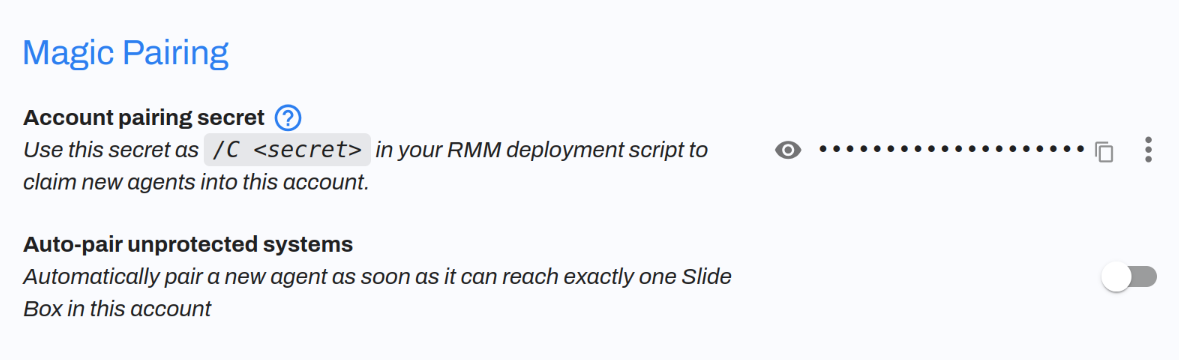
Account pair secret
Generate and manage it from the Account pairing secret control:
- Generate / Regenerate: create the secret, or replace it with a new one. Regenerating stops new installs from using the old secret; agents already enrolled are unaffected.
- Reveal / Copy: view the secret or copy it to paste into your RMM deployment.
- Clear: remove the secret so it can no longer be used to claim agents.
To deploy with it, pass it to the Slide Agent installer with the /C flag (on Linux, use -p). This is the same flag used for a regular pairing code (see RMM Installation):
Tip
To pair agents directly to a specific Slide Box during installation instead of leaving them as unprotected systems, use that Slide Box's device pair secret (see Slide Boxes).
Auto-pair
Auto-pair unprotected systems is off by default. When you enable it, an enrolled agent is paired automatically as soon as it can reach exactly one Slide Box on its local network. If it can reach more than one Slide Box (or none yet), it stays under Unprotected Systems so you can choose the right Slide Box yourself. Leave it off if you always want to confirm pairings manually.