Activity Logs
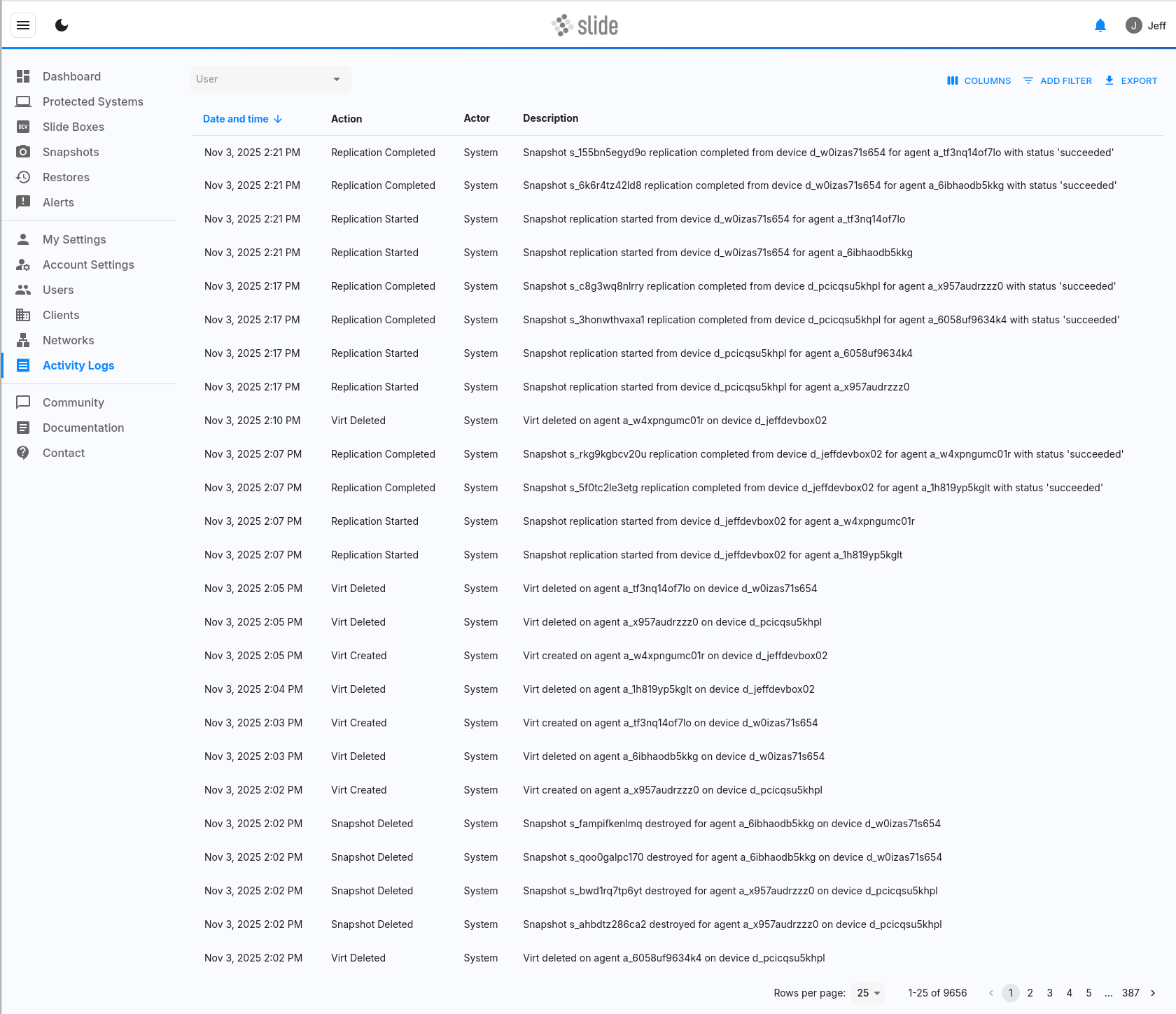
The Activity Logs page provides a comprehensive audit trail of all activities that occur within your Slide account. You can view, filter, and export activity logs to track user actions and system events for security, compliance, and troubleshooting purposes.
Activity Log Components
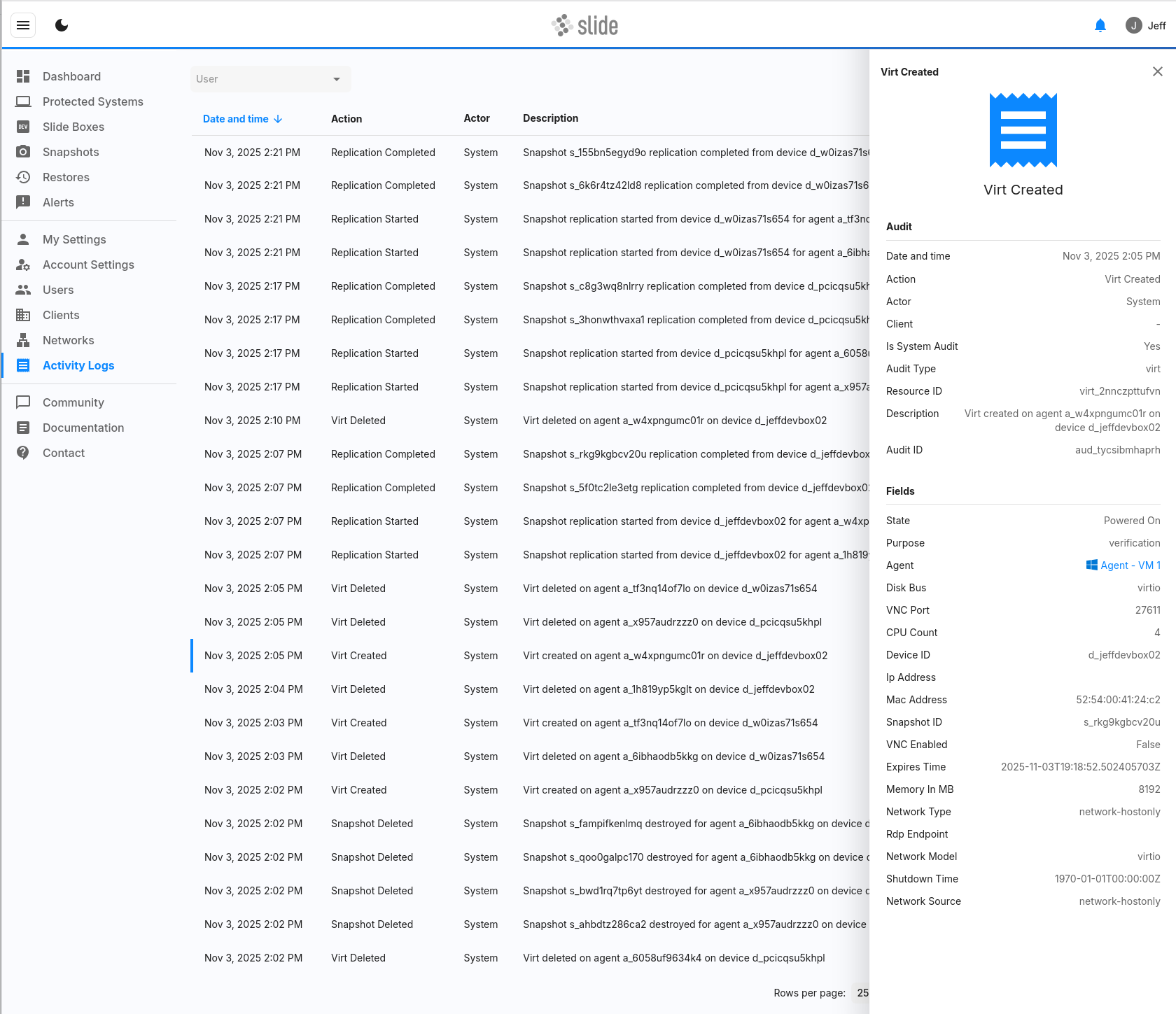
Each activity log entry contains the following information:
- Date and Time: The exact timestamp when the activity occurred, displayed in your account's timezone
- Action: A brief description of what action was performed (e.g., "User Created", "Backup Started", "Device Updated")
- Actor: The entity that performed the action:
- System: For automated system events and background processes
- User Name: For actions performed by specific users
- Description: Detailed information about the event, including relevant context and parameters
Activity Types
Activity logs capture various types of events across your Slide account. The following is a comprehensive list of all supported audit actions:
User Management Activities
- User Created: New user account created
- User Updated: User account information modified
- User Deleted: User account removed
- User Alert Config Updated: User alert preferences changed
- User Email Updated: User email address changed by admin
- User Email Changed Self: User changed their own email address
- User TOS Agreed: User accepted Terms of Service
- User API Token Created: API token generated for user
- User API Token Updated: API token modified
- User API Token Deleted: API token revoked
Account Management Activities
- Account Updated: Account settings modified
- Account Billing Updated: Billing information changed
Agent Management Activities
- Agent Settings Updated: Agent configuration modified
- Agent Paired: Agent paired to a device
- Agent Deleted: Agent removed from account
- Agent Unsealed: Agent passphrase entered/unsealed
- Agent Passphrase Added: New passphrase added to agent
- Agent Passphrase Deleted: Passphrase removed from agent
- Agent Migrated: Agent migrated to different device
- Updated Service Verification List: Selected services for service verification have changed
Device Management Activities
- Device Settings Updated: Device configuration modified
Backup Activities
- Backup Started: Backup initiated
- Backup Canceled: Backup cancelled
- Backup Success: Backup completed successfully
- Backup Failure: Backup failed
Restore and Recovery Activities
- Virt Created: Virtual machine created for restore
- Virt Updated: Virtual machine configuration modified
- Virt Deleted: Virtual machine deleted
- File Restore Created: File restore created
- File Restore Updated: File restore modified
- File Restore Deleted: File restore deleted
- Image Export Created: Image export created
- Image Export Updated: Image export modified
- Image Export Deleted: Image export deleted
Snapshot Management Activities
- Snapshot Deleted: Snapshot removed
Verification Activities
- Verify Filesystem Completed: File system verification completed
- Verify Boot Completed: Boot verification completed
Replication Activities
- Replication Started: Replication initiated
- Replication Completed: Replication completed
Filtering Activity Logs
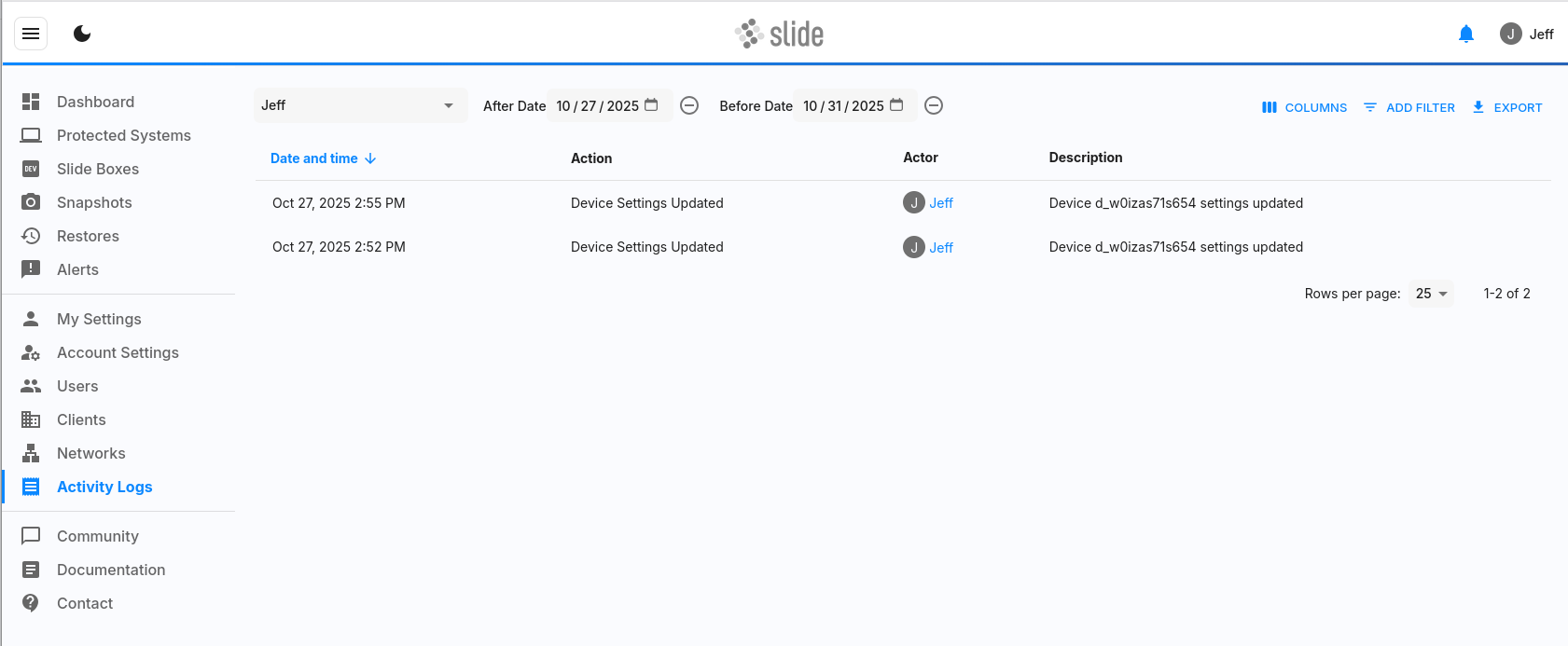
The Activity Logs page provides several filtering options to help you find specific events:
User Filter
Filter activities by the actor who performed them:
- All Users: Shows activities from all users and system events
- Specific User: Shows only activities performed by the selected user
Time-Based Filters
Filter activities by when they occurred:
- Time After: Shows activities that occurred after the specified date and time
- Time Before: Shows activities that occurred before the specified date and time
You can use these filters individually or in combination to narrow down your search. For example, you can view all activities performed by a specific user within the last week.
Exporting Activity Logs
You can export filtered activity logs to a CSV file for external analysis, reporting, or compliance purposes.
Export Process
- Apply any desired filters to narrow down the activities you want to export
- Click the "Export" button
- The system will generate a CSV file containing all activities that match your current filter criteria
- Download the file to your local system
CSV File Format
The exported CSV file contains the following columns with additional fields not visible in the console interface:
- audit_id: Unique identifier for the audit event
- actor_display_name: Display name of the user who performed the action (empty for system events)
- actor_email: Email address of the user who performed the action (empty for system events)
- actor_user_id: Internal user ID of the actor (empty for system events)
- audit_time: Date and time of the activity in UTC format
- audit_action: The specific action that was performed
- audit_type: The type of resource or entity that was affected
- affected_resource_id: Unique identifier of the resource that was modified
- audit_is_system: Boolean indicating whether this was a system-generated event
- audit_description: Detailed description of the event
- audit_source: Source of the audit event (e.g., "device", "console")
- audit_fields: JSON-formatted additional data about the event, including specific field changes
- client_id: Identifier of the client associated with the event (when applicable)
The CSV export provides more detailed information than what's displayed in the console interface, including technical identifiers, structured field change data, and additional metadata that's useful for detailed analysis and integration with external systems.
Use Cases
Activity logs are valuable for several purposes:
Security Monitoring
- Track unauthorized access attempts
- Monitor user behavior patterns
- Identify suspicious activities
- Audit user permissions and changes
Compliance and Auditing
- Maintain detailed records for regulatory compliance
- Generate audit reports for internal or external reviews
- Track data access and modifications
- Document system changes and maintenance
Troubleshooting
- Investigate system issues and errors
- Track the sequence of events leading to problems
- Identify root causes of failures
- Monitor system performance and health
Operational Insights
- Understand user engagement and usage patterns
- Track system utilization and capacity
- Monitor backup and restore operations
- Analyze maintenance and update activities
Access Permissions
Access to Activity Logs is controlled by user roles and permissions:
- Account Owner and Account Admin: Full access to all activity logs
- All other users: No access to activity logs
For detailed information about roles and permissions, see the Users documentation.